CloudEdge
- 4.3
- Rating
- 1.00M
- Installs
- Free
- Price

 Analysis by App-foxy
I spent time using CloudEdge as a home and small-business camera companion, paying particular attention to how comfortably it works for people with different abilities, routines, and levels of technical confidence. It is a free lifestyle app from Hangzhou Meari Technology Co., Ltd., designed around video services for families and organizations. That description sounds simple, but the practical experience depends heavily on the camera hardware connected to it, the quality of the network, and how much attention you want to give to alerts and live viewing.
My first impression was that CloudEdge is most useful when it has a clear job: checking a room while I am away, looking in on an entrance, or giving several people a way to view a shared camera. It is not an all-purpose smart-home control center, and I would not choose it for general household automation. Its value comes from bringing camera access into one place without requiring me to sit in front of a computer.
The app has been available since late 2017 and currently appears as version 6.1.3, with support beginning at Android 5.0. It is rated for Everyone, and its broad reach is reflected in more than a million installs, with an average score of 4.4 from roughly eighty-eight thousand ratings. Those figures suggest that many people find the basic idea dependable enough, although a popular camera app can still feel very different depending on the device it is paired with.
You May Also Like

 Blood Strike: 2.5 Anniversary
Blood Strike’s Loadouts Turn Every Drop Into a Tactical Gamble
A close look at Blood Strike’s custom loadouts: how fast access to signature weapons reshapes its battle royale rhythm, rewards preparation, and narrows the gap between fights.

 Pandora - Music & Podcasts
Pandora’s Music Is Easy to Start, but Harder to Recover
Pandora’s strength is its low-effort path from a seed to a station. Its weak spot is how much confidence it asks you to place in connection, setup, and quiet recovery.

 8 Ball Pool
 Is Built on Rivalries, Rematches, and Routine
A close look at the rivalries, rematches, shared routines, and unanswered safety questions that turn a quick pool match into a persistent mobile community.

 Samsung Music
’s Quiet Strength Is Playing What You Already Own
Its reach comes less from spectacle than from dependable access to a personal library. That simplicity is both the app’s strongest retention engine and its ceiling.

 AccuWeather: Weather Radar
AccuWeather Review: A Quick, Clear Forecast for Everyday Decisions
For everyday plans, the best forecast is the one you can understand quickly. AccuWeather makes rain timing, radar, and local conditions easy to act on, with a few trade-offs.

 Hill Climb Racing
Why Hill Climb Racing Still Turns Crashes Into One More Run
A tiny car, a bumpy hill and one more upgrade: Hill Climb Racing keeps resurfacing because its simple chaos makes every near-miss feel personal.
More From Our News Desk
View All News


How CloudEdge handles readability and navigation
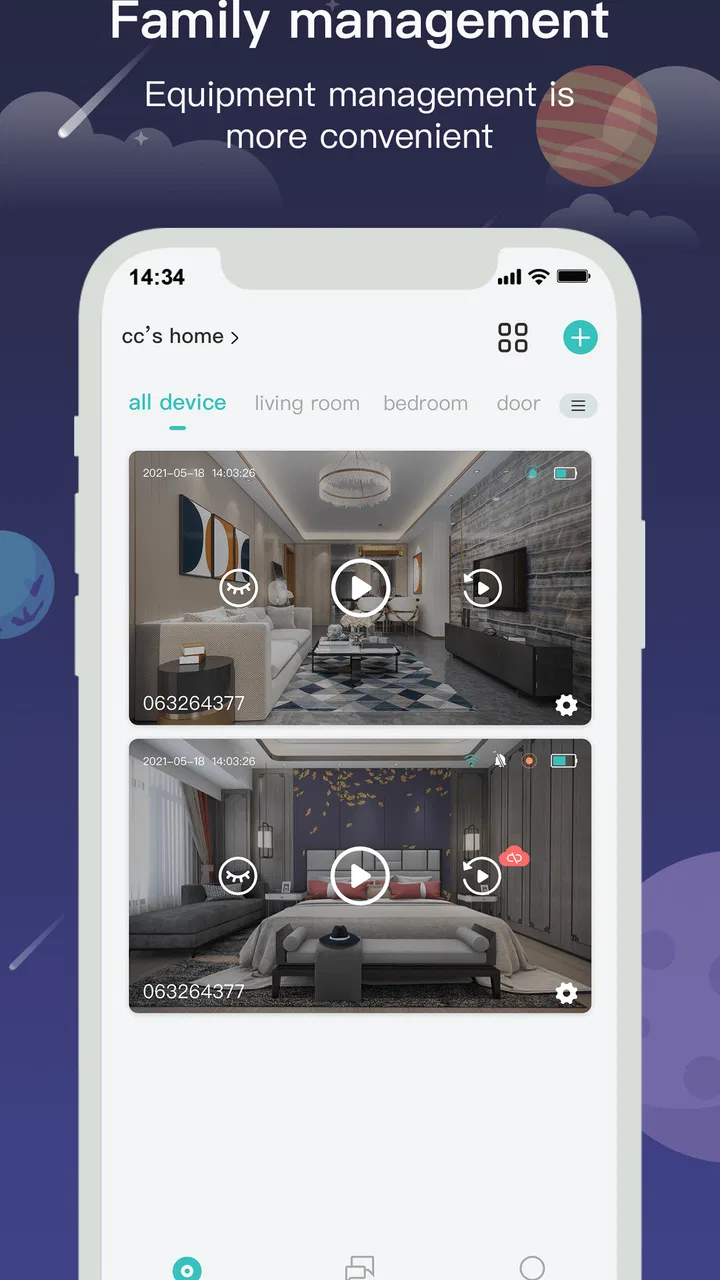
CloudEdge makes the most sense when I approach it as a sequence of tasks rather than as an app I browse casually. I open it to identify a camera, view what is happening, check an event, or adjust the way notifications behave. That task-based approach is helpful for users who prefer a predictable routine, because there is less reason to explore every screen once the camera is configured.
The most important accessibility advantage is the visual nature of the information. A live view can communicate a situation more quickly than a long text description, especially when I am checking whether a doorway is clear, whether a child has entered a room, or whether a delivery is waiting. At the same time, that strength creates a limitation: anyone who cannot comfortably interpret video will not receive the full benefit of the app. CloudEdge is fundamentally a visual monitoring tool, not a replacement for other forms of communication or assistance.
I recommend setting up a small number of meaningful camera names and keeping the arrangement easy to recognize. Names such as “front door” or “garage” are more useful in a hurried moment than labels that only make sense to the person who installed the system. This is a practical improvement rather than a special feature, but it makes shared use much easier when another family member needs to take over.
For readers with reduced vision, the real question is not only whether text can be read. It is also whether the important difference between a normal state and an event is obvious enough. A camera app can become tiring when a person must repeatedly inspect small visual changes or search through several screens. I found it better to use a deliberate checking routine: open the relevant camera, look at the live image, then review recent activity only when there is a reason. That avoids turning the app into a constant visual examination.
CloudEdge is also more approachable when I separate initial setup from everyday use. Pairing a camera, choosing a location, and deciding who needs access are decisions that deserve time. Once those choices are settled, ordinary checking should be much less demanding. I would not ask a less confident user to configure everything alone if a family member or colleague can prepare the system first and leave behind clear camera names and a simple viewing habit.
One useful trade-off is that a focused camera interface can be easier than a larger smart-home platform. Broader alternatives may combine lighting, locks, thermostats, speakers, and cameras, but that variety often means more menus and more ways to make a mistake. CloudEdge is narrower, so someone who only needs video monitoring may find it less mentally crowded. Someone who already manages many connected devices may instead prefer a platform that brings everything together.
Making the daily viewing routine easier
I found that the best experience comes from deciding in advance what deserves immediate attention. If every movement becomes equally important, the app can create unnecessary interruptions and make genuine events harder to notice. A better routine is to use CloudEdge for purposeful checks and treat alerts as prompts to investigate, not as proof that something serious has happened.
This matters for people who are easily distracted, anxious about notifications, or managing several responsibilities at once. A camera app should reduce uncertainty, not add a stream of small demands. I would begin with one camera and one use case, such as checking an entrance, before expanding the setup. That makes it easier to learn which views are genuinely useful and which ones only produce noise.
Another practical tip is to keep the phone’s display behavior in mind. If a user relies on larger system text, strong contrast, or a particular screen reader setup, the comfort of CloudEdge will depend partly on how its own controls respond to those phone settings. I would test the complete routine on the actual device that will be used every day rather than assuming that a setup that works for the installer will work equally well for everyone else.
Motor and sensory considerations in real use
CloudEdge can be convenient for people who have difficulty moving around a property, because a camera view may answer a question without requiring a trip to another room or a walk to the front door. That is one of its strongest inclusive uses. A person recovering from an injury, living with limited stamina, or caring for someone else can check a location from a seated position and decide whether physical action is necessary.
The benefit is greatest when the camera is positioned thoughtfully. A poor angle can force repeated checking, awkward phone handling, or a request for someone else to interpret what is visible. Before relying on the app, I would test the view at different times of day and from the positions where the intended user normally holds the phone. A camera that looks fine during installation may be less helpful when glare, shadows, or a partially blocked path changes the picture.
Motor accessibility also includes the number of taps and the precision needed to complete a task. People with tremors, limited dexterity, or one-handed use may find small controls and fast-changing screens more demanding than a typical user does. I would avoid making urgent decisions depend on a complicated sequence inside the app. For example, use CloudEdge to assess whether a situation needs attention, but do not treat it as the only method for handling an emergency.
Voice interaction can help with opening an app or reaching a phone function, but it does not automatically solve every problem inside a camera interface. A user may still need to identify a camera, interpret an image, or operate controls accurately. I therefore see CloudEdge as a useful part of an accessible routine, not a complete accessibility solution by itself.
For users with hearing loss, a visual camera view is naturally valuable because it does not depend on hearing what is happening in the monitored space. A person can inspect an entrance or room directly instead of relying only on an audible cue. However, the reverse limitation is important: a visual check may not reveal a sound-based event, and I would not assume that seeing a quiet image means the environment is quiet or safe.
People with light sensitivity or sensory fatigue may also need to be selective about when they use live video. Repeated movement, bright scenes, or rapid changes can be uncomfortable, especially when the phone is viewed in a dark room. In my experience, short, purposeful checks are more manageable than leaving a live feed open for long periods. The app is better suited to checking than to continuous visual immersion.
Sharing access without creating confusion
CloudEdge is potentially useful in homes and workplaces where more than one person needs to see a camera. Shared viewing can support a family member who cannot easily reach a doorway, a colleague responsible for a small premises, or a caregiver who needs to check a room from elsewhere. The inclusive value comes from distributing the task instead of assuming that one person must always be physically present.
That convenience needs a clear agreement about responsibility. If several people can view the same camera, everyone should know who is expected to respond to an event and who is only checking information. Otherwise, an alert may be seen by several people and acted on by nobody. This is not a technical flaw in CloudEdge, but it is an important human factor that becomes more serious when users have different abilities or availability.
I would also keep shared access as simple as possible. Give each person a role they understand, explain which camera matters to them, and show them the basic viewing path. A person who only needs the front entrance should not have to learn every part of the system. This reduces cognitive load and makes it less likely that someone will accidentally change a setting while trying to view an image.
Situational access: where the app helps most
The clearest everyday scenario is an apartment resident who hears a knock while carrying something, resting after an illness, or avoiding unnecessary trips down a hallway. Instead of opening the door immediately, they can use the connected camera to see whether the visitor is familiar or whether a package has been left outside. That extra information can make the next decision calmer and more deliberate.
Another useful situation is supporting an older relative who lives independently. A family member can use the camera service to check a shared area when there is a reason for concern, while the person at home retains the ability to go about the day without constant visits. This arrangement requires respect for privacy and a clear understanding of where cameras are appropriate. CloudEdge can make remote checking easier, but it cannot decide the boundaries that a household should set.
For a small business, the app may be practical when the owner needs a quick look at an entrance, stock area, or customer-facing space without sitting at a desk. The advantage is mobility: a person can check the situation while handling another task. The limitation is that a phone screen is not the same as a staffed security desk or a carefully monitored control room. I would use it for awareness and verification, not as the sole answer to every security need.
CloudEdge can also help when weather, mobility, or distance makes physical checking inconvenient. A camera view may show whether an area is occupied or whether something needs attention before a person leaves the house. This is especially useful when the cost of a needless trip is high. The app earns its place when it prevents small uncertainties from becoming unnecessary physical effort.
Compared with viewing a camera through a browser, a phone app is usually more convenient for quick checks because the phone is already nearby. Compared with a broad smart-home platform, CloudEdge may be easier to keep focused on video. Compared with a traditional monitor, it offers more freedom to check from another location, but it also depends more on the phone, the network, and the connected camera. The right choice depends on whether mobility or constant dedicated viewing matters more.
There is also a useful distinction between access and independence. CloudEdge can give a person information, but information is not the same as physical control. Seeing that a door is open does not necessarily let the user close it. Seeing a room does not remove the need for assistance if something must be moved, repaired, or reached. I would recommend it most strongly when the main need is observation and decision-making.
Remaining barriers and costs to consider
The app is free to install, but in-app purchases range from $1.99 to $359.99 per item. That wide range makes it important to understand what the connected camera setup requires before committing to a long-term arrangement. The app itself may be easy to try, but the overall cost of using a camera service can become a more significant consideration for families, carers, and small organizations working with a fixed budget.
CloudEdge also depends on a chain of equipment and conditions. The phone must be usable, the camera must be positioned well, and the connection must be reliable enough for the task. If any part of that chain is inconvenient, the app may feel less accessible than it appears in a quick demonstration. Someone with limited technical confidence should have a clear setup plan and a backup way to contact another person when the camera view is unavailable.
Privacy is another barrier that deserves an honest conversation. A camera in a shared home or workplace affects more people than the person holding the phone. Inclusive use means considering visitors, children, employees, and anyone who may be recorded without actively using the app. I would decide camera locations carefully, avoid unnecessary private spaces, and explain the purpose of each camera to the people affected.
Notifications can also become a source of stress. A user who is sensitive to interruptions may find frequent alerts exhausting, while a user who depends on prompts may be disadvantaged if important events are buried among minor ones. The safest approach is to establish a checking schedule and a response plan before relying on the app. CloudEdge can present video information, but the household still needs to decide how that information should influence behavior.
People who need strong nonvisual access should approach the app cautiously. Its central purpose is video, so anyone who cannot comfortably use visual content may need another monitoring method alongside it. Likewise, someone looking for advanced automation, detailed home integration, or a single dashboard for many kinds of devices may be happier with a broader ecosystem. CloudEdge is not the right fit simply because a person owns a smartphone.
Finally, the age rating of Everyone makes the app broadly approachable, but that label should not be confused with a guarantee that every user will find every screen effortless. Age suitability and accessibility are different questions. A child may be allowed to use the app while still needing an adult to explain privacy, camera responsibility, and what to do when an image is unclear.
My inclusive verdict on CloudEdge
I recommend CloudEdge to people who want focused remote video access and who can benefit from checking a space without physically going there. Its strongest contribution to inclusive use is straightforward: it can turn a camera into a source of information available from a more convenient location. That can support mobility limitations, caregiving routines, distance, and small-business oversight.
I would prepare the system around the person who will actually use it, not only around the person who installs it. Choose camera positions that produce understandable views, use clear labels, keep the daily routine short, and agree on who responds when something needs attention. Those steps do more for practical accessibility than simply downloading the app and hoping the interface will fit every situation.
The app is less suitable for anyone who needs a fully nonvisual experience, a complete smart-home hub, or a substitute for staffed security and emergency support. It also deserves caution when notifications, privacy, or recurring purchase decisions could create more pressure than convenience. In those cases, a different tool—or a combination of CloudEdge with another support method—may be the better answer.
Overall, I see CloudEdge as a useful, specialized lifestyle app rather than a universal solution. Its free entry point, mature availability, and large user base make it easy to consider, while the current 6.1.3 release keeps it relevant for supported devices. I would recommend trying it with one clearly defined camera task first. If that task becomes easier, safer, and less physically demanding, the app is doing exactly what it should; if it adds uncertainty or constant interruption, no amount of extra monitoring will make it the right choice.
FAQs for CloudEdge
01What features does CloudEdge offer for home security?
CloudEdge provides a comprehensive suite of features for home security, including real-time video monitoring, motion detection alerts, two-way audio communication, and cloud storage options for recorded footage. The app is designed to work seamlessly with a range of smart cameras, allowing users to monitor their homes remotely from anywhere.
02Is CloudEdge compatible with all smart cameras?
While CloudEdge is compatible with a wide range of smart cameras, it is essential to check the list of supported devices before purchasing. Compatibility can vary depending on the camera brand and model. Ensure your camera is supported by referring to the app’s documentation or the camera manufacturer’s specifications.
03What are the pros and cons of using CloudEdge?
Pros of CloudEdge include user-friendly interface, reliable cloud storage, and efficient motion detection alerts. However, some users have reported occasional connectivity issues and limited compatibility with certain camera brands. Overall, it offers solid security features but verifying compatibility with your device is crucial.
04How secure is the data stored on CloudEdge?
CloudEdge prioritizes user security by employing encryption protocols to protect data stored in the cloud. Users should ensure their cloud storage settings are properly configured and keep their app updated to the latest version to benefit from ongoing security enhancements. Always use strong passwords for added protection.
05Does CloudEdge require a subscription for cloud storage?
CloudEdge offers both free and subscription-based cloud storage options. While basic features may be available for free, premium plans provide extended storage capacities and additional features like advanced video analytics. Users can choose a plan that best suits their needs, considering their security requirements and budget.
Pros
- User-friendly interface for easy navigation.
- Real-time alerts enhance security monitoring.
- Supports multiple device connections.
- High-quality video streaming and recording.
- Customizable notification settings.
Cons
- Occasional app connectivity issues.
- Limited cloud storage without subscription.
- Notifications can be delayed at times.
- Some features locked behind a paywall.
- Needs stable internet for optimal use.

CloudEdge
Gallery